
顯示具有 software 標籤的文章。 顯示所有文章

gravatar

[Advertisement] Improving the VCS dumping VPD file size and performance

Running the simulation and generating huge VPD file in Synopsys VCS simulator? Disk space and file size might not be issues because hard disks are very cheap now. However, the system I/O of disks have huge impact in the whole simulation or post-processing.
We are introducing you a state-of-art technology to significantly reduce the file size and improve the VPD file writing performance in dumping and reading performance in DVE and waveform applications.

  • Advantages

    • No impact to the simulation performance.
      It might gain better performance with less system disk I/O.
    • Affordable price
    • Compatible with every build/release of VCS
    • Compatible with most POSIX UNIX-like OS
    • Suitable for any HDL, digital or analog, RTL, or gate-level.

  • It is definitely legal

    • No extra Synopsys VCS license requires
    • No reverse-engineering and no VCS installation or bundle file changes/modifies/patches
    • No extra file or design needs to be compiled into the simulation
    • No re-compile efforts
Allow us to keep you informed about the latest announcement, release, and package prices.

gravatar

iPhone SDK Articles

在 iPhone SDK Articles 有些不錯的簡單 Tutorials。Objective-C 本身語法已經不是重點,重點在於 Interface Builder 的用法,從以前在 Mac OS X 10.4 的 Xcode 用過的建立 attribute、action 到現在的版本都有些不小的差異。在 Table View Tutorial - Part I 還有 screen 動畫可以複習一下新的用法。新的 Interface Builder 視窗真多,已經多到 13" WXGA macbook 螢幕都快容納不下,還好 iPhone 模擬視窗只有那麼一丁點。但是還是外接更大的寬螢幕用起來才是王道。

gravatar

用 Adeona 找回失竊電腦的資訊

第一次看到 Adeona 的資訊,是在 OpenFoundry 的電子報。詳細內容就請看電子報內容囉。當時覺得很有趣也很有用,就在 MacBook 上裝了。
在這裡特別下的標題是找回失竊電腦的資訊,而非找回失竊電腦。因為並無法幫助使用者馬上找回失竊電腦,而是提供和提高一些線索的機會。Adeona 會把使用者的資料,像是目前 IP, Wireless SSID, iSight 照下來的圖片,經過加密後存在 OpenDHT 的 server 上。目前這些 server 是由 PlanetLab 維護的 200~300 台 Linux 機器。
一旦裝了 Adeona 後,請記得把產生的 adeona-retrievecredentials.ost 備份下來,供以後必要時候用來作身份認證使用。否則直接放在安裝的 NoteBook 上,被幹走了當然連這檔案都沒辦法取得,要事後跟 OpenDHT 要回可能的資料是不可能的。同時設定的密碼也是要牢記,因為他沒有 central server 管理你的帳號密碼,因為根本也不回要你註冊帳號。所以有了 adeona-retrievecredentials.ost 沒有密碼,也是作白工。
當真的有需要取回有關資訊時候,同樣也要安裝 Adeona 程式,然後執行 /Applications/Adeona/adeona-retrieve.term。這是個 Terminal 設定,他會執行 /usr/local/adeona/adeona-retrieve.exe。然後就是選擇之前的 adeona-retrievecredentials.ost接著會問你要取回哪個時間範圍,以及數量的選項。以及輸入正確密碼。都無誤後,會向 OpenDHT 取回相關資訊。如果當初有透過 iSight 擷取圖片,也會下載下來。基本上不一定下可以取回全部紀錄的時間所記載的資訊,像是可能電腦狀態相同,就沒有上傳; 或是網路問題等等。下載的圖片解析度為 160x120px,雖然小但是對於正面看著螢幕操作電腦的距離來說,已經是可以非常清楚辨識出面貌。另外還有 internal ip, external ip(如果是使用 NAT 或是 AP 的話), nearby routers(基本上就是類似 traceroute 的結果)。同樣,這些資訊並無法幫助使用者取回電腦,只是提供部份線索,以及提高尋回的機會。
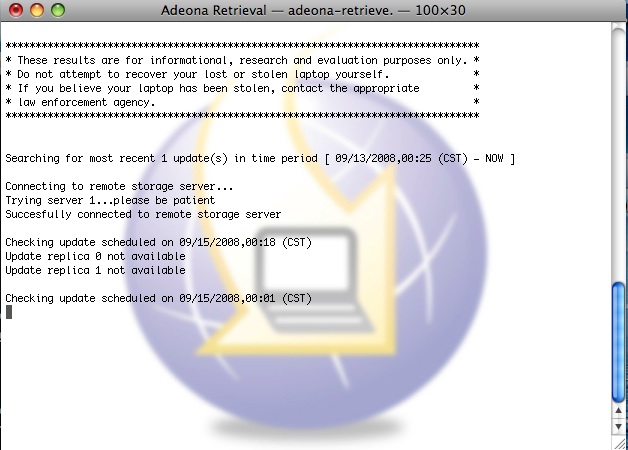
缺點的話,如果 iSight 鏡頭被刻意遮掩住,當然就無法取得照片資料。另外,電腦開機後,因為沒有密碼所以可能沒辦法進系統操作。雖然 Adeona 在開機就啟動,也有辦法在登入前就有能力回傳資料。但是大部分除非被接上網路而且是可以直接存取 Internet,否則要對方透過像是 Wireless AP 之類的,通常還是要使用者登入。當然因為對方不知道帳號密碼,所以不可能登入。電腦內當然也不可能有對方 AP 帳號,也不可能直接就連上 Internet。況且對方甚至就直接重灌 OS,當然本來在電腦內的 daemons 就不復存在。除非這種功能是類似內建在 Firmware 的軟體。

** 部份畫面圖片直接引用自 http://adeona.cs.washington.edu/osxretrieveguide.html

gravatar

Shrink the Disk Image

Trying Carbon Copy Cloner to copy the whole DVD to disk image. Unselect language packages, printer drivers, and Xcode tools; Using block level copy to new sparse image. After the copy completion, you mount the disk image and you can find the used size is < 4.7G but the disk size is ~= original DVD size. Because the underlay partition and file system is still the same as them in DVD. However, just run this 'hdiutil resize -size min xxx.sparseimage'. It will shrink the partition and file system size to possible minimum.
Note: If you delete some file and resize it, the disk size is still not changed because some files might be still occupied in the tail of the file system.

gravatar

RD = Redo & Debug

聽說 SS 社的 L 大作在 '05 狂 crash,銷售也不佳,後來 training 以及 code review 時機乎最重要的重點就是,注意 pointer。只要遇到 pointer 的情況,有 * or -> 就很容易被 focus。例如 function body 前面加入對 pointer 類型的 parameters 做 check,只要情況不對馬上謝絕掉。或許這招不錯用,至少可以馬上降低 crash 次數,畢竟幾乎所有的 invalid segment access 都可以避掉,立竿見影。至少這樣可以避免得到 crash comment 一枚,因為程式沒到該有的功能所以得到 bug functional。(註:只要列出來 call stack 就是 core dump,所以單純 return 沒做事至少不會出事)。 不過源頭呢?為什麼會有 invalid address 傳進去?當然就是程式有 bug,一定有地方出錯了,所以才讓那個 bug 一直存活下來,然後還傳遞給其他地方使用。現在好了,大家看情況不對,就盡量謝絕掉。那最後一定還是會出錯,只是出錯就會錯在無法避免的地方。可能最終的源頭跟最後出鎚地點相差十萬八千里,但是 AE/QA 就會看 call stack 或執行過哪些 commands 就把 bug submit 給誰。更慘的是,如果是遇到無法 reproduce 的 bugs,更是查不到來源,因為無法再重複一次,但是他就是曾經 core dump 出來給你看。最後只是 RD 猛去 disassemble 那個位址的 assembly code 來看,然後找相對應 source code 那邊是否有 pointer access 沒有保護好或有 bug。 再來是,大家一定遇過 core dump,最常見的就是 windows 的程式執行錯誤。或是 firefox 遇到 crash 也會有。Apple 也有 crash report 功能。裡面有什麼東西,大家一定看過,不外乎就是 call stack、thread list、module list、environment variables、registers、stack dump、memory dump。就連 unix-like 的環境,也可以產生一個 core file。最神奇的是 SS 社,雖然有 segment fault handler,雖然有 coredump file,但是其實裡面是 call stack 而已,連個 registers values、stack dump、memory dump 都沒有。如果是單純的筆誤 bug,很容易看一下相對應的 source code 就查到了。但是大型軟體下,又無法 reproduce,什麼都沒有 dump,只有 call stack function chain,查得到來源才有鬼。

gravatar

Firefox 2.0 (with Websense Bypass Modification)

Here is the page of my personal build Mozilla Firefox 2.0. In this version, it adopts a method to bypass the Websense content filter. Just read the details in the page. We have Windows 32bit version binary and Mac OS X PowerPC G4 (7450) version binary of Firefox. For somebody will still encounter browsing difficulities behind Websense network, just adjust some perferences in Firefox (about:config).

  1. set network.http.keep-alive to false
  2. set network.http.max-persistent-connections-per-server to 0
Please refer to this page for details.